Image
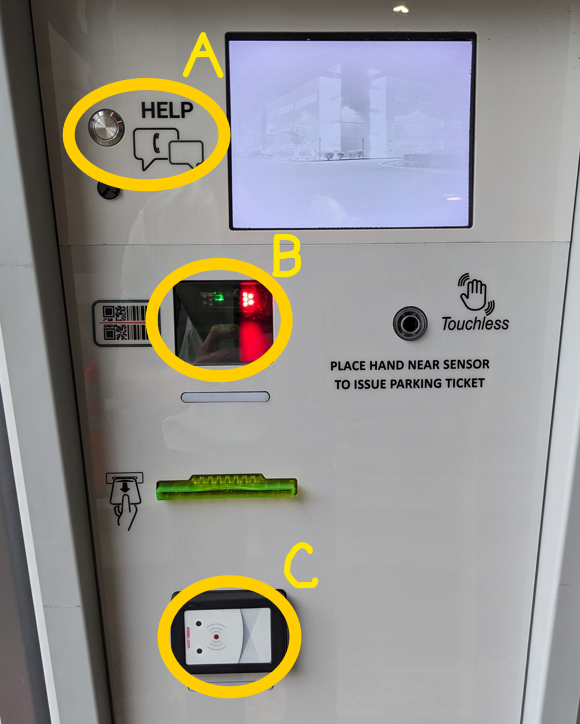
We offer multiple ways to access your assigned gated facility. Depending on your affiliation and permit type, you can access gated facilities using a number of different methods.
Should you have issues accessing your assigned facility, please press the button for assistance located at every gated entry/exit (Labeled "A" in photo below). These calls are recorded and monitored 24/7.
RFID Permit - All paid annual permits and temporary "RF" permits utilize RFID technology. There is no need to scan your permit, the RFID chip in the permit is read as you pull up to the gate granting you access. Please make sure the pass is hung on your rear view mirror and is clearly displayed to avoid access issues. Do not display expired hangtag permits; they will slow the response of the gates.
QR Code - All temporary and annual permits have a QR code on them that can be scanned at gates to allow access. Hold the QR code 1 to 2 inches from the red light (Labeled B in photo below), you will hear a beep when it has been successfully scanned. Passes can be printed or scanned directly from a mobile device.
Duke ID Card - Barcodes on the back of Duke IDs can be scanned at gates to allow access. Hold the barcode 1 to 2 inches from the red light (Labeled "B" in photo below), you will hear a beep when it has been successfully scanned. Health System IDs will also work if you tap them at any prox card reader (black box on gates, labeled "C" in the photo below). You will hear a beep when it has been successfully scanned. Please note, it may take up to 24hrs for access to be added for new IDs or permits.
NFC Readers - NFC readers are currently available at select locations: Parking Garage 1, Parking Garage 2, Parking Garage 3, Science Drive Garage, Allen Lot, Blue Zone, Card Lot, Smith North & Smith South lots. Please follow these instructions provided on the OIT website to set up your Duke Mobile Duke ID. Tap your mobile device at the gates for access (Labeled "C" in the photo below), you will hear a beep when it has been successfully scanned. Please note, it may take up to 24hrs for access to be added for new IDs or permits.